📖 stewbeet.plugins.ingame_manual
📄 Source Code: stewbeet/plugins/ingame_manual/__init__.py 🔗
📄 Source Code: stewbeet/plugins/ingame_manual/shared_import.py 🔗
📄 Source Code: stewbeet/plugins/ingame_manual/main.py 🔗
📄 Source Code: stewbeet/plugins/ingame_manual/book_components.py 🔗
📄 Source Code: stewbeet/plugins/ingame_manual/book_optimizer.py 🔗
📄 Source Code: stewbeet/plugins/ingame_manual/craft_content.py 🔗
📄 Source Code: stewbeet/plugins/ingame_manual/image_utils.py 🔗
📄 Source Code: stewbeet/plugins/ingame_manual/iso_renders.py 🔗
📄 Source Code: stewbeet/plugins/ingame_manual/other_utils.py 🔗
📄 Source Code: stewbeet/plugins/ingame_manual/page_font.py 🔗
🔗 Dependencies
- ✅ Required: StewBeet framework initialization
- ✅ Required:
Your definition plugin(seedefinitions_setup.mdfor details) - 📍 Position: Should be placed after definition setup and before finalization plugins
(seebasic/beet.ymlfor an example)
📋 Overview
The ingame_manual plugin generates an interactive in-game manual/guide book for Minecraft datapacks.
It creates a comprehensive documentation system with item information, crafting recipes, and navigation.
The manual features clickable pages, hover effects, and high-resolution item displays.
(This plugin requires the initialize plugin and item definitions in memory to function properly.)
Some Features Showcase
In-game Manual Example:
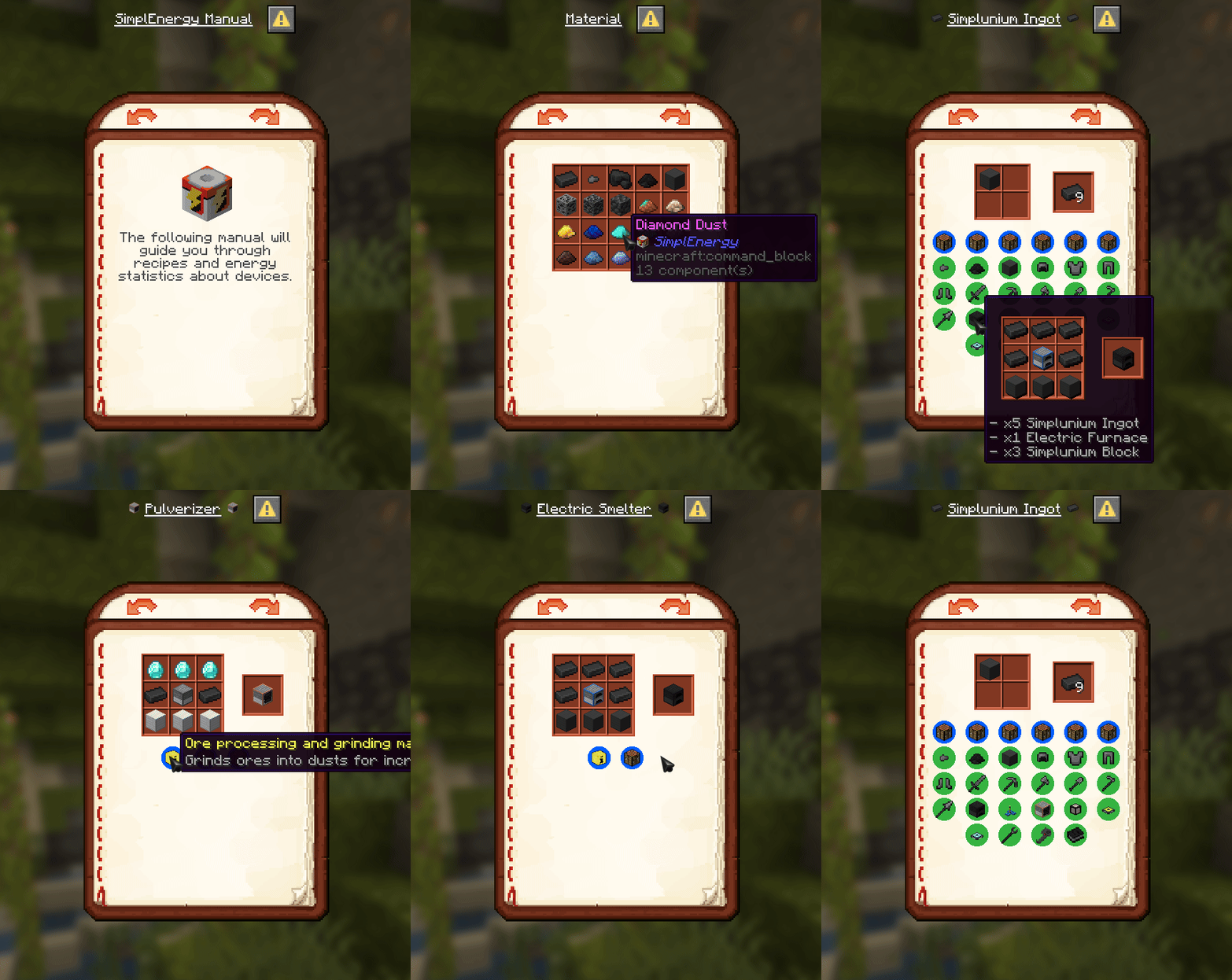
🎯 Purpose
- 📖 Creates interactive in-game manual with item documentation
- 🍳 Displays crafting recipes with visual representations
- 🖼️ Generates high-resolution item renders and textures
- 🏷️ Organizes items by categories with navigation
- 🎨 Provides customizable manual assets and fonts
- 🔗 Links related items with clickable page navigation
⚙️ Configuration
🎯 Basic Example Configuration
pipeline:
  - ...
  - src.setup_definitions  # Load item definitions into memory
  - ...
  - stewbeet.plugins.ingame_manual  # Might take a while the first time
  - ...

meta:
  stewbeet:
    # Directory containing all project textures
    textures_folder: "assets/textures"

    # Configuration for in-game manual
    manual:
      debug_mode: false
      manual_overrides: "assets/manual_overrides"
      high_resolution: true
      cache_path: "manual_cache"
      cache_assets: true
      cache_pages: false
      json_dump_path: "manual_cache/content.json"
      name: "" # Defaults to "{project_name} Manual"
      max_items_per_row: 5
      max_rows_per_page: 5
      first_page_text: [{"text":"Modify in beet.yml the text that will be shown in this first manual page", "color":"#505050"}]
      showcase_image: 3 # 1 = will generate an image showcasing all the items in the manual, 2 = all items even not in the manual, 3 = both
📋 Configuration Options
| Option | Type | Default | Description |
|---|---|---|---|
debug_mode | boolean | false | Enables grid display in the manual for debugging |
manual_overrides | string | "assets/manual_overrides" | Path to directory containing custom manual assets that override defaults |
high_resolution | boolean | true | Enables high-resolution crafting displays in the manual |
cache_path | string | Required | Directory for storing cached manual assets |
cache_assets | boolean | true | Enables caching of Minecraft assets and item renders |
cache_pages | boolean | false | Enables caching of manual content and images |
json_dump_path | string | Required | Path for manual debug dump |
name | string | "" | Manual title used in book and first page. Defaults to "{name} Manual" |
max_items_per_row | integer | 5 | Maximum number of items displayed per row in manual (max: 6) |
max_rows_per_page | integer | 5 | Maximum number of rows displayed per page in manual (max: 7) |
first_page_text | TextComponent | [{"text":"Modify in beet.yml...","color":"#505050"}] | Text component used for the manual's first page |
showcase_image | integer | 3 | Controls generation of showcase images: 0=disabled, 1=manual items only, 2=all project items, 3=both |
✨ Features
📖 Manual Generation
- 📚 Written Book Creation - Generates complete written book with navigation
- 🏷️ Category Organization - Groups items by category with dedicated pages
- 🔄 Page Management - Handles page numbering and cross-references
- 📝 Content Optimization - Optimizes book content for performance
🎨 Visual Components
- 🖼️ High-Resolution Displays - Advanced item rendering system
- 🎯 Custom Fonts - Specialized font system for manual elements
- 🖌️ Image Processing - Texture generation and manipulation
- 🎨 Asset Management - Custom manual assets and overrides
🍳 Recipe Integration
- 📐 Shaped Crafting - Visual representation of shaped recipes
- 🔲 Shapeless Crafting - Organized display of shapeless recipes
- 🔥 Furnace Recipes - Smelting and cooking recipe displays
- ⚡ Special Recipes - Support for custom recipe types
🔗 Interactive Features
- 🖱️ Clickable Navigation - Page linking and category browsing
- 💬 Hover Effects - Item information on hover
- 📄 Wiki Integration - Item wiki components and descriptions
- 🔍 Smart Filtering - Recipe type filtering and organization