# stewbeet.plugins.auto.text_renders
The `auto.text_renders` plugin adds a `render` key to Minecraft text components.
Anywhere a text component can appear (an item lore, the `source_lore`, a `tellraw`, a manual dialog),
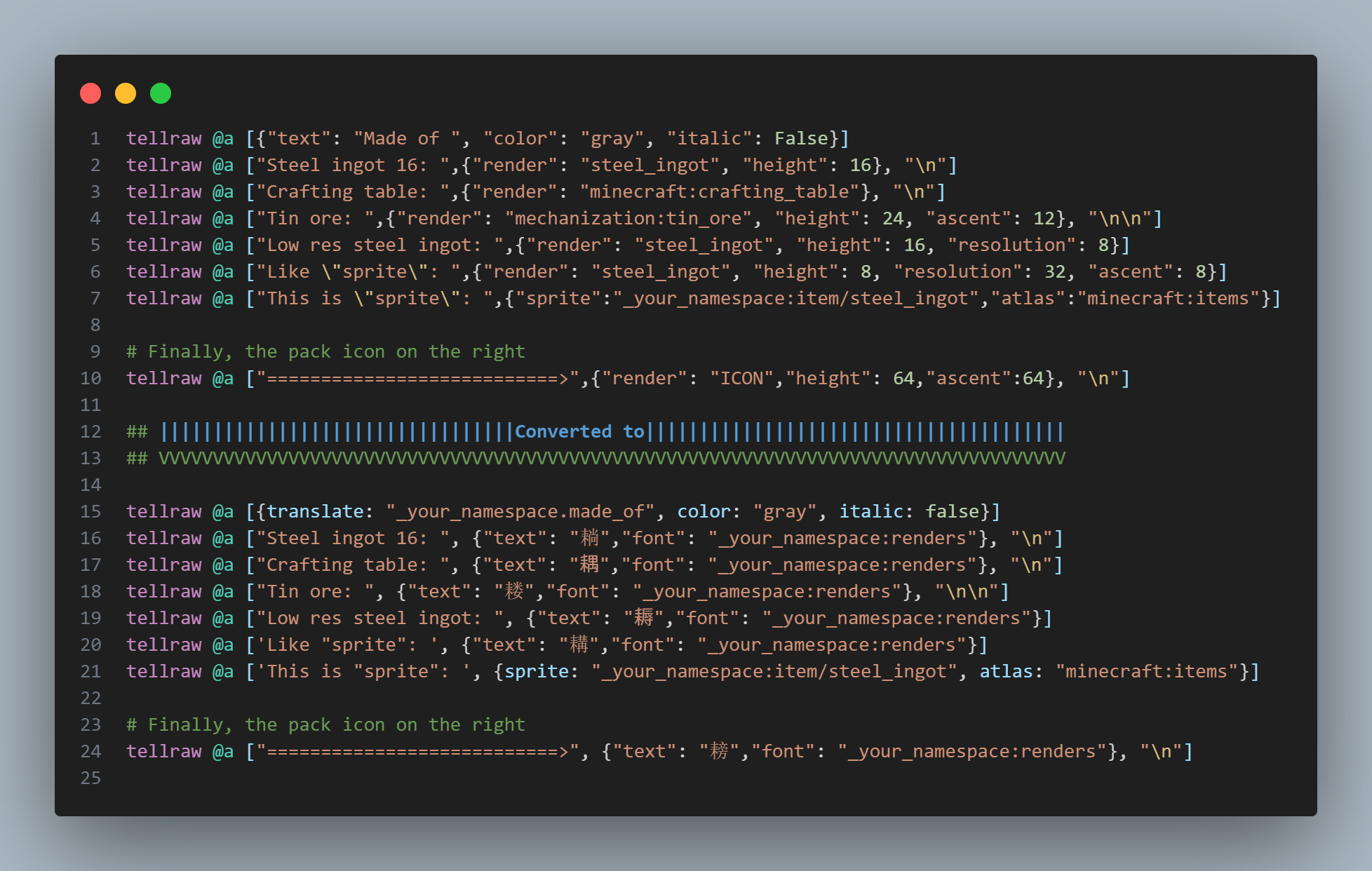
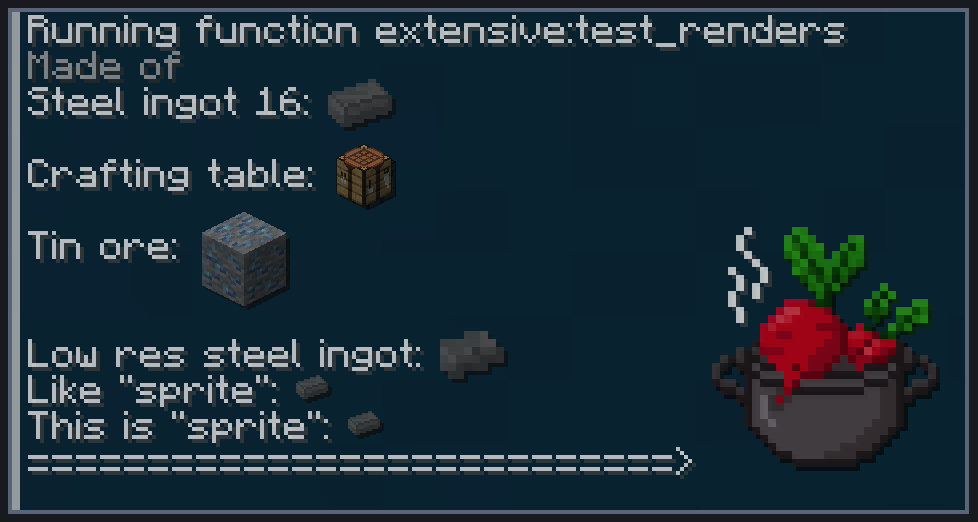
`{"render": "steel_ingot"}` becomes a picture of that item, drawn with a bitmap font the plugin generates for you.
No font to declare, no unicode character to reserve, no texture to place: write the item id and the glyph appears.
### Feature Showcase
**Example of text components code being modified to use font glyphs:**
 **And the result in-game:**
 **Required**: Beet context with generated datapack files
**Required**: Item images in `iso_renders_path` (produced by `ingame_manual`, or dropped there yourself)
**Position**: After `auto.lang_file`, before `auto.headers`
**Related**: [`ingame_manual`](../7_ingame_manual/en.md) shares the same item renders, [`initialize`](initialize.md) owns `source_lore`
**Source Code**: [`stewbeet/plugins/auto/text_renders/__init__.py`](https://github.com/Stoupy51/StewBeet/blob/main/python_package/stewbeet/plugins/auto/text_renders/__init__.py)
## What it does
- Scans every generated datapack file for `render` keys inside text components
- Resolves each item id to a PNG: a project item is rendered with `model_resolver`, a `minecraft:` item is downloaded, any other namespace is read from `iso_renders_path`
- Generates one glyph per distinct `(item id, height, ascent, resolution)`, and one texture per distinct `(item id, stored pixels)`
- Writes them all into a single `:renders` font
- Rewrites the files, replacing each `render` node with `{"text": "", "font": ":renders"}`
## The `render` key
```jsonc
{"render": "steel_ingot"} // bare id -> your project namespace
{"render": "minecraft:stone"} // a vanilla item
{"render": "mechanization:tin_ore"} // an item from another pack
{"render": "ICON"} // your pack.png
{"render": "steel_ingot", "height": 32} // displayed height in pixels, default 16
{"render": "steel_ingot", "resolution": 64} // shrink the stored texture to 64px, display unchanged
{"render": "steel_ingot", "ascent": 7} // baseline offset, default centers the glyph on the text
```
### `height` is what you see, `resolution` is what is stored
There is no width to set. A Minecraft bitmap provider only takes a `height`, and the on-screen width
follows the texture's aspect ratio, so a glyph is always scaled and never stretched.
`resolution` is how many real pixels the texture keeps. **By default the source image is stored
untouched**, so a 256px item render still ships at 256px even when shown 10 pixels tall. That is what keeps
a glyph sharp at high GUI scales, where a 10px glyph covers 40 real pixels.
Set `resolution` when you would rather trade some of that sharpness for a smaller resource pack:
```jsonc
{"render": "steel_ingot", "height": 10, "resolution": 64}
```
That shrinks the stored texture to 64px tall while still displaying it at 10. Set
`text_renders.default_resolution` to apply it to every render of the pack at once.
Textures are named after the pixels they store, so several glyph heights of the same item share one file.
An animated vanilla texture (a vertical strip of frames) is cropped to its first frame instead of being
squeezed into a ribbon.
`render`, `height`, `ascent` and `resolution` are consumed by the plugin. **Every other key of the node is kept**, so a render
carries its own `color`, `hover_event` or `click_event` like any other component:
```json
[
{"text": "Smelted from ", "color": "gray"},
{"render": "raw_steel", "height": 10, "hover_event": {"action": "show_text", "value": "Raw Steel"}},
{"text": " raw steel", "color": "gray"}
]
```
A node carrying `render` must not also carry `text`: the glyph occupies that slot, and the plugin warns then drops it.
### Pictures bigger than one glyph
Minecraft stitches every glyph into a 256x256 font atlas, and one that fits in no sheet is drawn as the
missing-character box, so a logo stored at 1000x370 would come out as a row of boxes rather than a picture
(`FontTexture`, `DynamicAtlasTree` and `FontSet` in the game's own code). The plugin cuts it into a grid of glyphs instead, and
puts it back together in the text component: the tiles of a row sit side by side, a negative space brings
the pen back to the left edge, and the next row hangs from a lower ascent.
```jsonc
{"render": "logo", "height": 37} // a 1000x370 source: 8 glyphs, 4 columns of 2 rows
```
Nothing changes on your side: it is still one `render` node, and it still comes out as one component. The
reconstruction is pixel exact, spacing included, because the stored texture is snapped to a whole multiple
of the displayed size so every cut lands on a real texture pixel.
That costs one texture per tile, so the first build to run into it asks in the terminal:
```
[WARNING] 'mypack:logo' renders at 1000x370 pixels, more than the 256x256 Minecraft fits in one glyph.
It can be cut into 8 glyphs stitched back together with negative spacing, which costs 8 textures in the
resource pack. Answering no shrinks it to a single glyph.
Cut it into glyphs? [Y/n]
```
The answer is remembered in `.beet_cache`, so later builds stay quiet. Answering no shrinks the render down
to a single 256px glyph instead. A build with no terminal to answer on (a CI job, an editor, a script) never
blocks: it prints the warning, cuts the render, and asks again next time. Set
`text_renders.allow_oversized` to `true` or `false` to answer up front and skip the question entirely.
Two things are worth knowing before shipping a big picture:
- **Chat wraps.** A wide render is a long run of characters like any other text, so it wraps when it does not
fit the line. Keep it under the width of its container, or put it in a manual page rather than in chat.
- **The part above the baseline caps the resolution.** `BitmapProvider.Definition.validate` refuses a
provider whose `ascent` exceeds its `height` (*"Ascent 128 higher than height 32"*), so a glyph's box always
contains the baseline: the topmost row reaches down to it and has to fit in one glyph on its own.
A render keeps at most `256 * height / ascent` pixels; past that, the plugin stores it smaller and says
so, rather than producing a font Minecraft would reject. Lowering the `ascent` is what buys the
resolution back, at the price of the picture hanging lower on the line:
| `ascent` on a 1024px logo shown 128px tall | Stored | Glyphs |
|---|---|---|
| `128` (entirely above the baseline) | 256x256 | 1 |
| `64` (half above, half below) | 512x512 | 4 |
| `32` | 1024x1024 | 16 |
A picture sitting **entirely** above the baseline is therefore always stored at 256px at most, whatever
its `height` or `resolution`: the whole of it is then the part that has to fit in one glyph.
An `ascent` larger than the `height` works too, floating the picture above the line of text: the texture is
padded down to the baseline with transparency, which is the only shape Minecraft accepts.
### Where the images come from
| Item id | Source | What you have to do |
|---------|--------|---------------------|
| `steel_ingot`, `mypack:steel_ingot` | Isometric render of the item model, via `model_resolver` | Nothing |
| `minecraft:stone` | Downloaded from the Minecraft wiki | Nothing |
| `mechanization:tin_ore` | `/mechanization/tin_ore.png` | Drop the PNG there yourself |
| `mechanization:tin_ore` | `/mechanization/tin_ore.png`, when the first one is missing | Drop the PNG there yourself |
| `ICON` | Your `assets/pack.png` | Nothing |
`stewbeet clean` deletes `iso_renders_path`, since everything else in it is generated.
Hand made pictures (a logo, a countdown, an icon drawn for the pack) therefore go in `textures_folder`, which survives it.
An id that resolves to nothing gets a warning and is left untouched in the output, so a typo never silently
disappears from a message.
### Using it without the rest of StewBeet
The plugin needs no item definitions. A project item is looked up in `Mem.definitions` when StewBeet is
driving the build, and otherwise falls back to the conventional `item/` model of your resource pack, so
a plain beet project renders its own items just the same:
```yaml
require:
- "stewbeet"
pipeline:
- "stewbeet.plugins.auto.text_renders"
```
With `assets//models/item/widget.json` in your resource pack, `{"render": "widget"}` works out of
the box. Vanilla ids, other packs' ids and `ICON` never needed definitions in the first place.
## Configuration
### Basic Example Configuration
```yaml
pipeline:
- ...
- stewbeet.plugins.auto.lang_file
- stewbeet.plugins.auto.text_renders
- stewbeet.plugins.auto.headers
- ...
meta:
stewbeet:
# Shared with ingame_manual: an item is only ever rendered once
iso_renders_path: "iso_renders"
text_renders:
default_height: 16
default_resolution: 0 # 0 = store each source image untouched
font: "renders"
```
### Configuration Options
| Option | Type | Default | Description |
|--------|------|---------|-------------|
| `iso_renders_path` | string | `"manual_cache/items"` | Folder holding the per-item PNGs, as `//- .png`. Shared with `ingame_manual`. |
| `text_renders.default_height` | int | `16` | On-screen glyph height used when a render node omits its own `height`. |
| `text_renders.default_resolution` | int | `0` | Texture height used when a render node omits its own `resolution`. `0` stores each source image untouched. |
| `text_renders.font` | string | `"renders"` | Name of the generated font, inside the project namespace. |
| `text_renders.cache_assets` | bool | inherits `manual.cache_assets` | Reuse the item PNGs that already exist instead of regenerating them. |
| `text_renders.allow_oversized` | bool | asked in the terminal | Whether a render bigger than 256x256 may be cut into a grid of glyphs. `false` shrinks it to a single glyph instead. |
## Features
### Works on everything already generated
The pass runs late, on the text of the generated files rather than on the definitions. By then every item
component has been serialised into loot tables, `give` commands and dialogs, so one scan covers:
- 🏷️ Item lores and `item_name`, through the generated loot tables
- 💬 `tellraw`, `title` and any other command carrying a text component
- 🎨 The `source_lore` shared by every item of the pack
- 📖 The `ingame_manual` dialogs, whose item titles are glyphs rather than 16x16 atlas sprites
Running after `auto.lang_file` also keeps the two passes independent: the lang plugin never sees a glyph, and
this one never sees a translate key.
### One glyph per distinct render
- 🔁 The same item at the same height reuses a single provider, however many times it appears
- 🗂️ Glyphs that only differ by `ascent` or `height` share one texture instead of writing it twice
- 📐 The stored texture keeps the source aspect ratio, and Minecraft derives the on-screen width from it
- 🧮 The default ascent centers the glyph on the line of text (`height / 2 + 3`, which is vanilla's `7` for an 8px glyph), whatever its size
- ✂️ A picture too big for one glyph is cut into a grid of them and put back together with negative spacing, pixel for pixel
### Shared with the manual
- 📦 `ingame_manual` and this plugin read the same `iso_renders_path`, so an item is rendered once per build
- ⚡ With the manual in the pipeline, the renders already exist and nothing is regenerated
- 🏷️ Dialog titles ask for their glyph directly, so they keep the full render resolution instead of the
16x16 an atlas sprite forces. They fall back to a sprite when no image can be resolved, and an animated
texture keeps its sprite so it does not freeze on the first frame.
## Next steps
- [In-game manual](../7_ingame_manual/en.md): the other consumer of the item renders.
- [initialize](initialize.md): the `source_lore` that every item carries.
- [All plugins](README.md): the rest of the pipeline, in the order it runs.
- [Configuring the build](../3_beet_config/en.md): enabling, ordering and configuring plugins.